OrderEasy
LIVERetailer + customer shop SaaS
One shop, two surfaces: the counter that bills and the customer who orders from it.
Not a marketplace. Not a delivery company.
retailer.ordereasy.win
Builder & founder · Delhi NCR, India
An army of narrow AI assistants: one runs a shop's counter, one works case law, one reads tax invoices.
OrderEasy
One shop, two surfaces: the counter that bills and the customer who orders from it.
View productCiteBench
A research desk for Indian practice: diary, matters, and authorities in one place.
View productGSTSlip
Photograph a tax invoice, get a clean register row you can export.
View productProduct demos
Four guided walkthroughs, right here. No sign-up, seed data only.
Walk the demosOne month of AI agents
Writing code got cheap. Reviewing it didn’t.
Read the noteSwipe the screen or tap a line to change
retailer.ordereasy.win
Career breadth: Embedded electronics, Sensors, Fintech, Banking, Medical systems, Casino gaming, Image pipelines, Data science, AI assistants, Retailer POS, Case-law research, GST capture.
Every product here is live, a URL you can open today, and each carries its own line saying what it is not. The previews are real screens captured on seed data.
Retailer + customer shop SaaS
One shop, two surfaces: the counter that bills and the customer who orders from it.
Not a marketplace. Not a delivery company.
Case-law research desk
A research desk for Indian practice: diary, matters, and authorities in one place.
Suggestions are not court directions.
India GST invoice capture
Photograph a tax invoice, get a clean register row you can export.
Fields stay on the device until you export.
10 free documents, then ₹499/month Pro
Four guided journeys, 42 real screens, right here on the page. Every screen is a capture of the product running on seed data. Click one to see it full size, or use the arrow keys.
OrderEasy · Retailer (GreenCart Mini Mart)
01 / 11 · Open the shop
A plain username-and-password card: no store picker, no workspace chooser. The account is the shop, so signing in lands straight on that shop’s dashboard.
02 / 11 · Open the shop
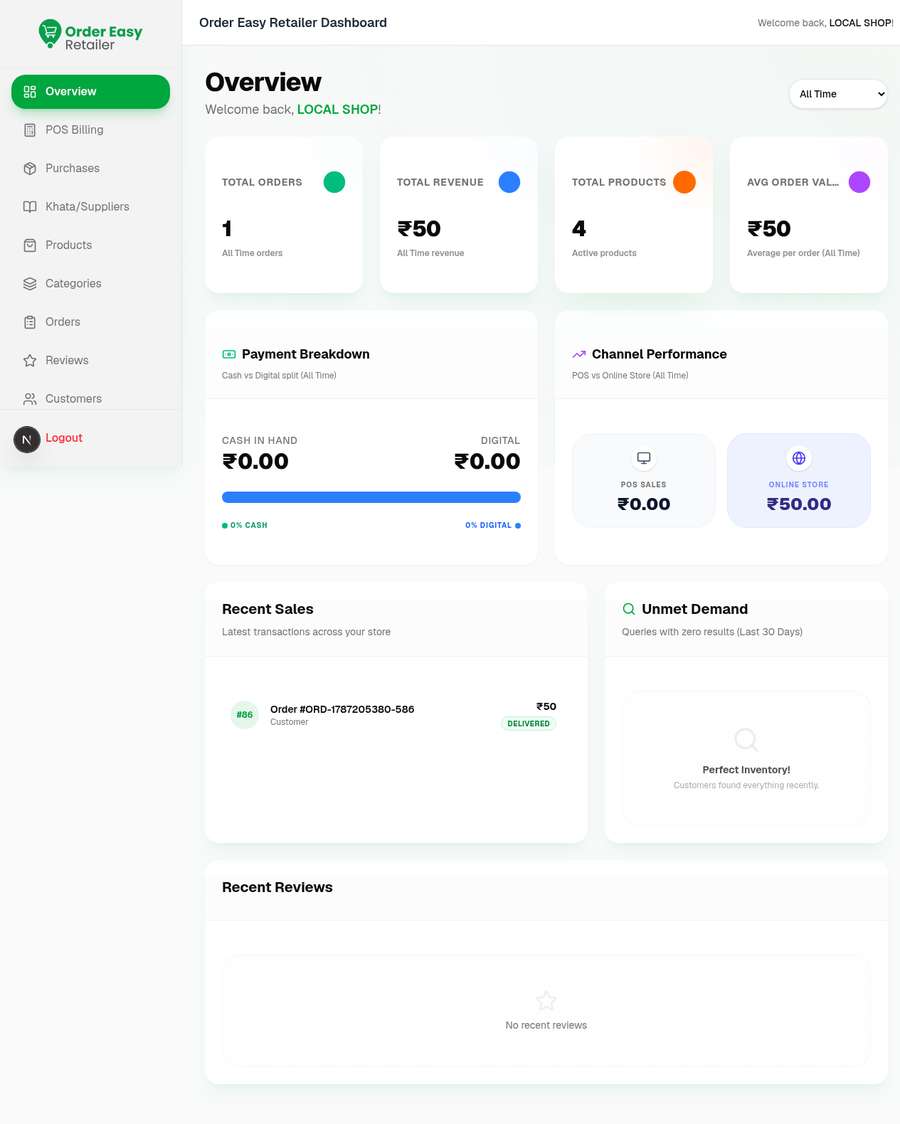
Four KPIs for the selected range (orders, revenue, active products and average order value) with a cash-versus-digital split and a POS-versus-online split underneath.
03 / 11 · The counter
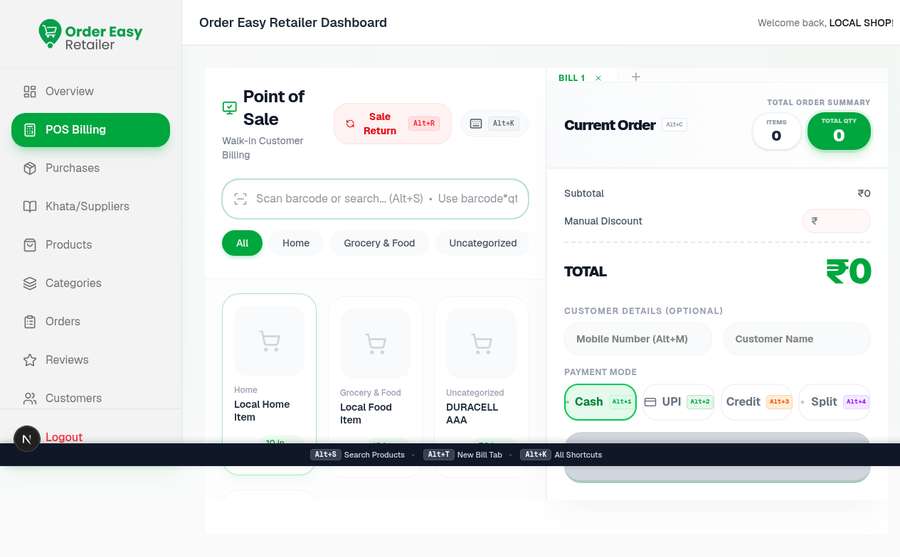
The counter screen is a scan box, a product grid and a running cart. Cash, UPI, credit or a split, all from the same panel.
04 / 11 · The counter
The catalogue sorts by stock state first: All, Low Stock, Out of Stock and Negative Stock each get a filter card. Every row carries a selling price against a struck-through MRP.
05 / 11 · Stock & suppliers
Inward stock is recorded as a purchase invoice, with what is listed and what is still unpaid side by side. The unpaid figure is the same one the khata carries.
06 / 11 · Stock & suppliers
The same outstanding amount seen on Purchases, now arranged by who is owed, with each distributor’s contact on the row.
07 / 11 · The storefront
Every order sits in one list, tagged Online or Store and filterable by stage from Pending through Delivered. The sidebar badge counts what still needs the shop.
08 / 11 · The storefront
A cart-value rule, a percentage and a flat amount: three offers, three different shapes, each with its dates and its redemptions on the card.
09 / 11 · The storefront
Each weekday gets a toggle and an opens/closes pair, so late Fridays and a short Sunday are a setting, not a sign on the door.
10 / 11 · Catalogue & customers
A walk-in with no account history next to an app user with orders, spend, last activity and a credit balance carried on the shop’s own books.
11 / 11 · Catalogue & customers
Categories ship with the store. Renaming a generic one creates a private version for this shop, so one shop’s wording never moves anyone else’s shelves.
Run one shop: counter, stock, suppliers and incoming orders.
The surface for the person behind the counter. Bill at POS, book the distributor bill, keep the supplier khata straight, take the orders customers send in, and set the hours the shop takes them.
Small shop is fine. Start with a few products and the first bill.
OrderEasy · Customer (GreenCart Mini Mart)
01 / 10
The app opens on a location check. GPS is offered first; when it cannot confirm a service city, a city list takes over.
02 / 10
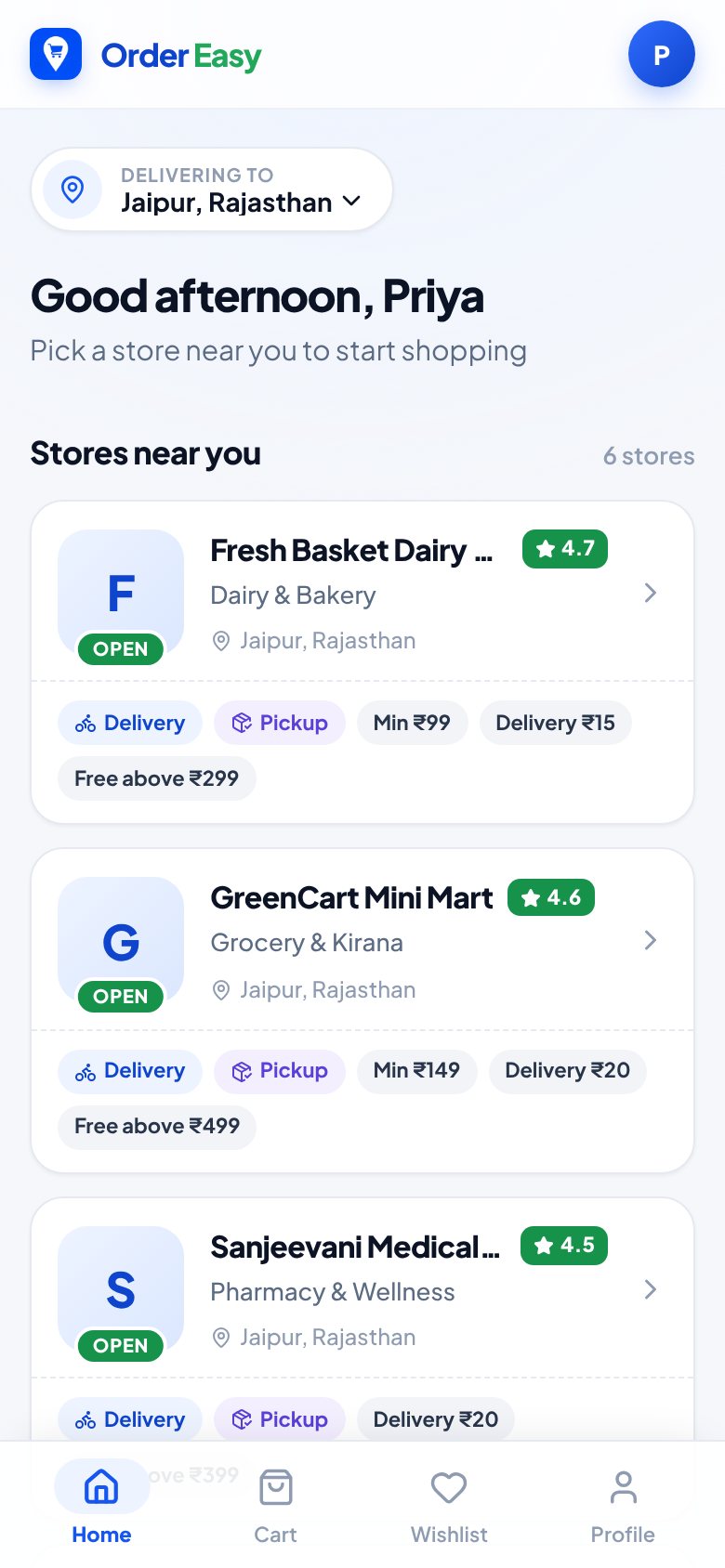
Every shop is listed with its delivery and pickup badges. It is a directory of shops, not one merged storefront: you order from one shop at a time.
03 / 10
The shop’s own home: its address, open or closed state, offers and categories. The header keeps the shop visible the whole time.
04 / 10
Offers, Best Selling and Buy Again, with unit, price, struck-through MRP and the shop’s cart-offer badge. Add and quantity controls sit on the tile.
05 / 10
Quantity steppers, then the totals: subtotal, what the shop’s cart offer saved, and the amount payable.
06 / 10
One screen carries all three choices. If the shop is closed, the order is scheduled rather than refused.
07 / 10
The order is created against the shop, not a platform: the shop’s name, phone and street address sit above the per-line amounts.
08 / 10
Past and active orders stack up with status, the shop they were placed with and the amount. Each row opens the same order screen.
09 / 10
Chat is attached to the order, so the shop already knows which one you mean. Quick replies cover the questions people actually ask.
10 / 10
FAQs and a feedback tab in one sheet. The answers route you to Orders for tracking, order chat for missing items, and Profile for addresses.
Order from the shop you already know. Not a mall.
The other half of the same product. Pick your city, open the shop you already buy from, fill a cart from its shelves, choose delivery or pickup, and message the shop on the order itself.
Not a marketplace. Not a delivery company.
CiteBench · Chamber
01 / 11
The chamber is the workspace: one sign-in and the whole practice is on the desk.
02 / 11
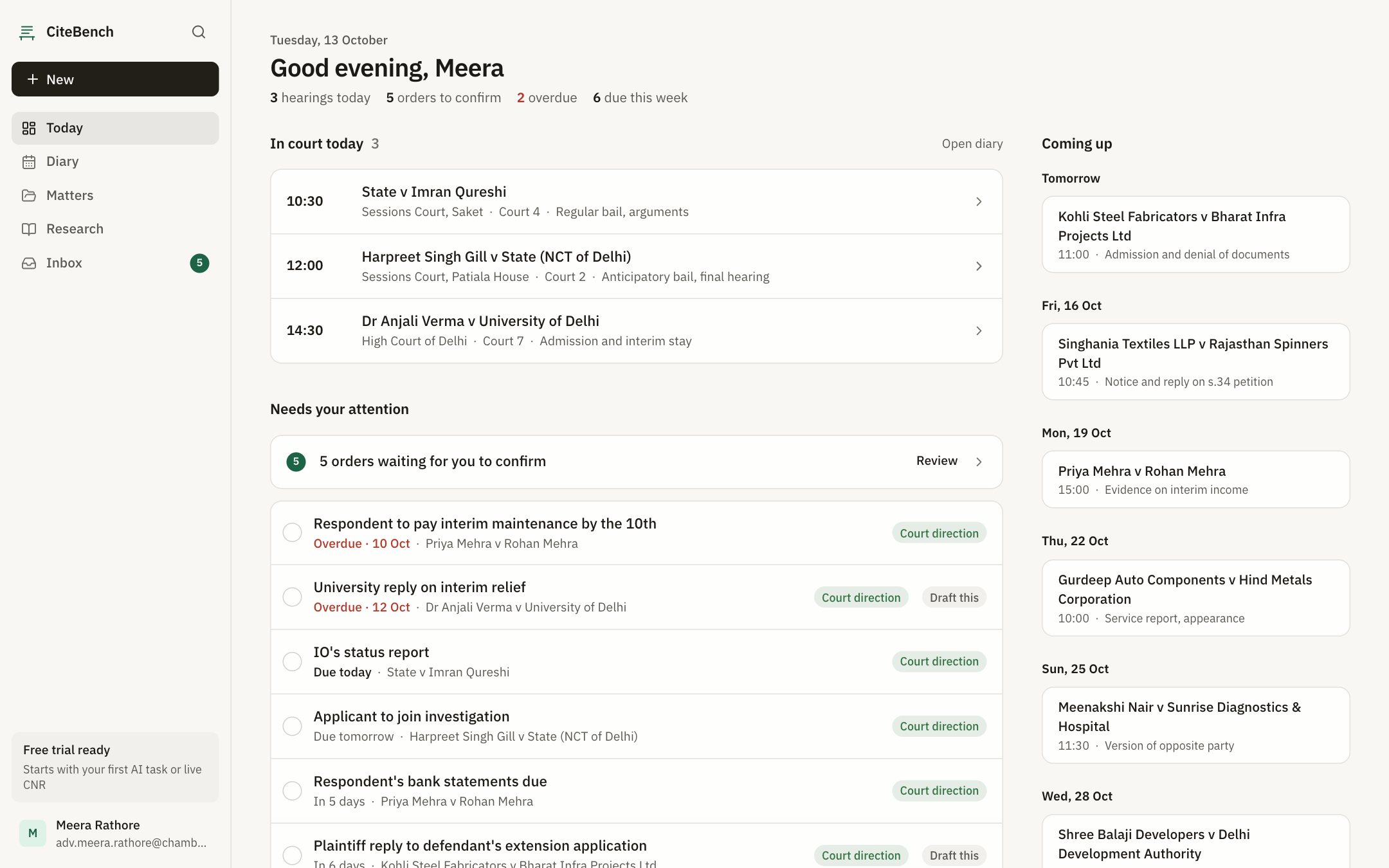
Start on Today, the short list of what needs attention now, before anything else.
03 / 11
The day’s list of hearings and dates, checked first thing.
04 / 11
Matters are proceedings, not checklists: each one moves through its own stages.
05 / 11
Orders, the file and the clocks that run on it, all in one place.
06 / 11
Describe the facts, frame the legal question, pick the court, and search.
07 / 11
Authorities are shown as retrieved, with their source, so nothing is invented between the search and the screen.
08 / 11
Court directions and CiteBench suggestions are shown separately. Suggestions are not court directions.
09 / 11
Skim the inbox when something new lands on a matter.
10 / 11
Saved chats sit under each matter. Answers cite only authorities that were retrieved, with the source linked beneath.
11 / 11
Change language when the brief needs it, without leaving the screen.
What needs you today: diary, matters and research for Indian practice.
A case-law research desk built around how a chamber actually runs. Start on Today, work the diary, open a matter as a proceeding, then research by facts, legal question and court.
Suggestions are not court directions.
GSTSlip · Invoice capture
01 / 10
Photograph a GST tax invoice, upload JPEG, PNG or PDF pages, try a sample, scan an e-Invoice QR, or enter it by hand.
02 / 10
Add more pages or start the next invoice. Up to four pages per invoice; line items are read from the table.
03 / 10
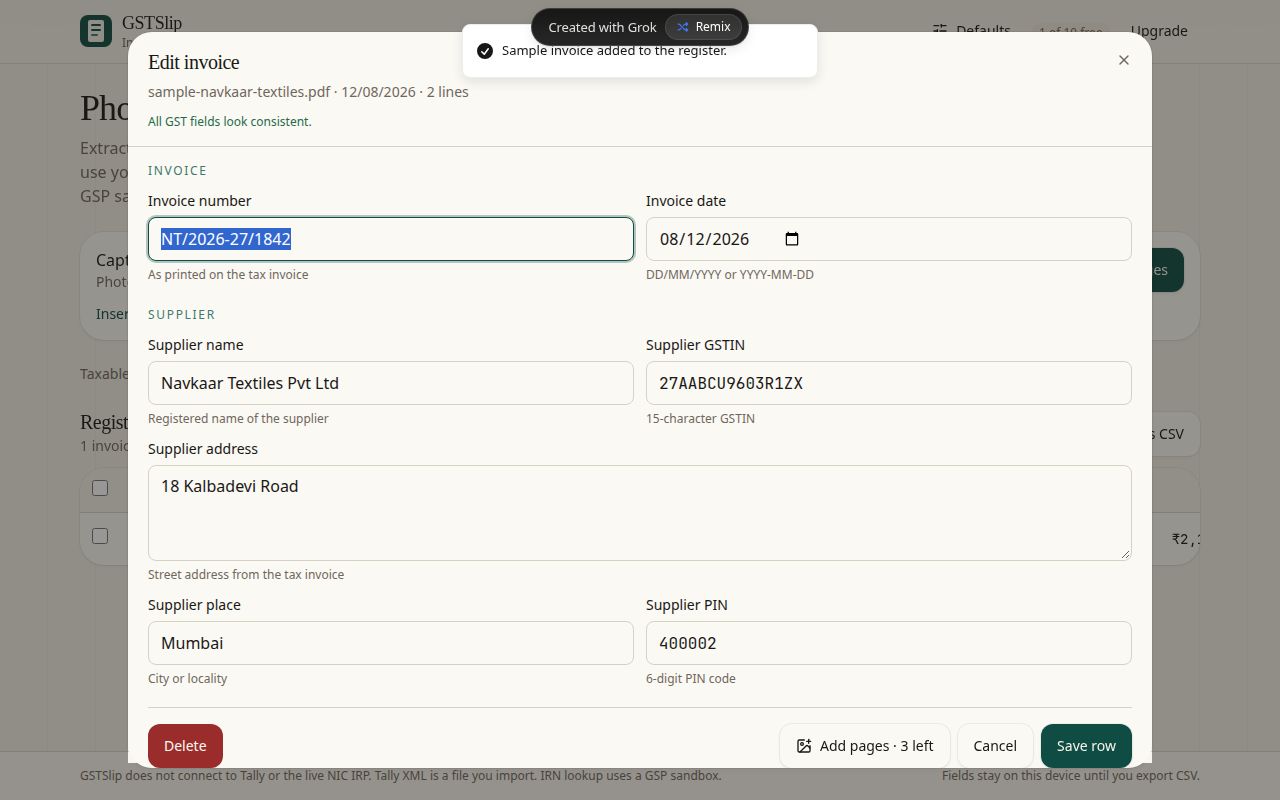
Invoice number, date, supplier and buyer GSTIN, addresses, place of supply and totals, read from the photograph.
04 / 10
Description, HSN/SAC, quantity, taxable value and the CGST/SGST/IGST split per line. Edit or add lines before saving.
05 / 10
Set your buyer GSTIN, place of supply and other defaults. Missing header fields on a new invoice use them.
06 / 10
Invoice number, parties, HSN, taxable value, tax split and total on a single row. Tap a row to edit it.
07 / 10
An invoices CSV or a separate line-items CSV. Data leaves the device only when you export.
08 / 10
A file you import into Tally. GSTSlip does not connect to Tally directly.
09 / 10
IRN and e-Invoice details can be filled from a sandbox GSP lookup, not the live NIC IRP. QR scan and manual entry work too.
10 / 10
Start with 10 free documents. Pro is ₹499 a month with Tally XML and IRN included.
Photograph a GST invoice. Get a clean register row.
Point a camera at a tax invoice or upload its pages. GSTSlip reads the header, line items, addresses and IRN, fills gaps from your defaults, and hands back a register you can export as CSV or Tally purchase XML.
GSTSlip does not connect to Tally or the live NIC IRP. Tally XML is a file you import. IRN lookup uses a GSP sandbox.
Pulled from the public repos on GitHub. Every line links to the merged pull request, the commit or the deploy behind it. Open pull requests say so, and a line without a link is a decision, not a ship.
Latest 10 of 59
Features 5
New things people can do
The phone POS scans barcodes with the camera: the back camera opens full height and stays on, so each scan adds the product to the bill, and an unknown code opens quick add.
retailer_ordereasy_njs #145 ↗Distance-based delivery fees: retailers set a flat fee or distance tiers with a per-km rate, customers with a GPS pin see the shops that deliver to them with the fee for their distance, and checkout refuses an address outside the shop's radius.
RetailerCustomerPlatform #200 ↗Customers can filter past orders by status, date range and order number.
customer_ordereasy_njs #98 ↗Retailers can reset a forgotten password with a one-time code sent to the username, phone or email they log in with. Codes are single use with an attempt cap, and a reset signs out other sessions.
RetailerCustomerPlatform #198 ↗The three catalogue-field bundles from 6 Oct merged into the backend and both apps, along with fixes found in review: a coupon that no longer applies is refused at checkout instead of silently dropped, and purchase returns follow the bill's supplier.
RetailerCustomerPlatform #186 ↗Design 1
Redesigns and layout
The retailer POS works on a phone by default: a single-column item list with big add and quantity buttons and a sticky bill bar, in place of the old "desktop recommended" warning.
retailer_ordereasy_njs #144 ↗Fixes 2
Bugs found and closed
The POS product list stopped timing out in production after the 24 Oct deploy: product-group siblings are no longer listed on every row unless asked for.
RetailerCustomerPlatform #195 ↗Customer sign-up only replaces a leftover account with the same phone, email or username when that account never verified and never ordered.
RetailerCustomerPlatform #193 ↗Infra & tooling 2
CI, deploys, speed, tracking and pipelines
The POS loads products and the shop profile once per page load instead of on every screen and bill, and takes sold quantities off its own stock list after each sale.
retailer_ordereasy_njs #141 ↗Placed orders are now sent to Meta as purchase events through the Conversions API, straight from the backend, with tests.
RetailerCustomerPlatform #191 ↗October 2026
The phone POS scans barcodes with the camera: the back camera opens full height and stays on, so each scan adds the product to the bill, and an unknown code opens quick add.
retailer_ordereasy_njs #145 ↗The retailer POS works on a phone by default: a single-column item list with big add and quantity buttons and a sticky bill bar, in place of the old "desktop recommended" warning.
retailer_ordereasy_njs #144 ↗Distance-based delivery fees: retailers set a flat fee or distance tiers with a per-km rate, customers with a GPS pin see the shops that deliver to them with the fee for their distance, and checkout refuses an address outside the shop's radius.
RetailerCustomerPlatform #200 ↗Customers can filter past orders by status, date range and order number.
customer_ordereasy_njs #98 ↗Retailers can reset a forgotten password with a one-time code sent to the username, phone or email they log in with. Codes are single use with an attempt cap, and a reset signs out other sessions.
RetailerCustomerPlatform #198 ↗The POS loads products and the shop profile once per page load instead of on every screen and bill, and takes sold quantities off its own stock list after each sale.
retailer_ordereasy_njs #141 ↗The POS product list stopped timing out in production after the 24 Oct deploy: product-group siblings are no longer listed on every row unless asked for.
RetailerCustomerPlatform #195 ↗Customer sign-up only replaces a leftover account with the same phone, email or username when that account never verified and never ordered.
RetailerCustomerPlatform #193 ↗The three catalogue-field bundles from 6 Oct merged into the backend and both apps, along with fixes found in review: a coupon that no longer applies is refused at checkout instead of silently dropped, and purchase returns follow the bill's supplier.
RetailerCustomerPlatform #186 ↗Placed orders are now sent to Meta as purchase events through the Conversions API, straight from the backend, with tests.
RetailerCustomerPlatform #191 ↗Nothing in this filter yet.
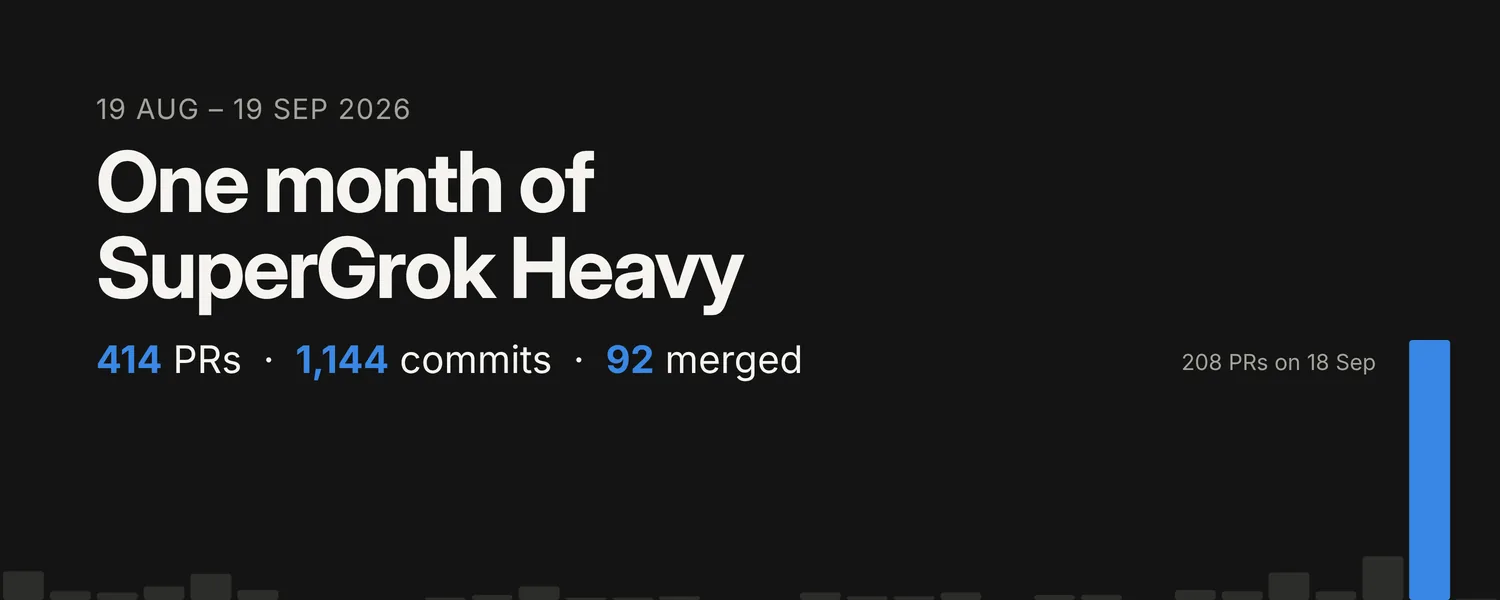
19 Aug to 19 Sep 2026. One SuperGrok Heavy seat, a fleet of Cursor cloud agents, and what git says actually happened.
Writing code got cheap.
Reviewing it didn’t.
Grok wrote the code for the first 48 hours, until the weekly quota ran out. After that the split was Grok for planning and review, Cursor cloud agents for code, and me on the merge button. Three weeks on, 80 small PRs are folded into 3 bundles and the review board holds 561 findings, 47 rated High.
Source: git log across all branches and PR refs (merge commits excluded) and the GitHub PR list, 19 Aug to 19 Sep 2026 IST, pulled 9 Oct 2026.
Articles I first posted on X or on a product site, kept here in one place. Each links back to the original.
5 min read
Any shop in India can now register on OrderEasy. Bill from your phone, scan barcodes with the camera, and keep stock and khata in one place. Free for a limited period.
Read3 min read
Then the usage CSV landed, and the last twenty-four hours looked less like a workday and more like a small storm that decided to live on my laptop.
Read2 min read
GST invoices arrive as photographs, scans, JPEGs, PNGs, and PDFs. The useful output is less picturesque. A clean register row.
Read“I want to build an army of AI assistants, each handling one specific piece of work.
OrderEasy
The shop assistant
Bills the counter, keeps stock and the supplier khata, and takes orders from the customers who already know the shop.
CiteBench
The chamber clerk
Keeps the diary and the matters, and researches case law by facts, question and court, showing only what it actually retrieved.
GSTSlip
The accounts clerk
Reads a tax invoice from a photograph and hands back one clean register row, ready for CSV or Tally.
Not one assistant that claims to do everything. A set of narrow ones, each with its own surface, its own guardrail and its own definition of done. A general assistant is a demo. A narrow one is a colleague.
The products are the first recruits, and each one says plainly what it is not. None of them pretends to do another one’s job.
The build loop is the same shape every time: cloud agents work branches in parallel, an AI planner reviews, and I decide what merges. Django on the backend, TypeScript on the surfaces, everything deployed to Cloudflare. When an assistant can hold a whole job end to end, it stops being a tool and starts being staff.
I build products with AI. I write the backend, the surface and the copy, then sit with the support mail. That whole loop is the job I actually wanted.
Ten years of Python and Django before this, across embedded electronics and sensors, fintech and banking, medical systems, casino gaming, image pipelines and AI data work. Different industries, same habit: get the thing into somebody’s hands and watch what breaks.
Dad of two, in Delhi NCR. That is most of the reason the tooling has to be fast and the scope has to stay honest.
@vin8003 is a lab notebook, not a brand channel. Progress, dead ends and the occasional rewrite go up as they happen.
Questions or notes on the products, the demos, or how something is built? Email is the fastest way in. Socials are on the right.
vin8003@gmail.com